Options work is construction work. A view on a stock is one decision; expressing it in options is a dozen more — expiry, strikes, which legs, what width, debit or credit, how much premium you're exposed to and where the position breaks. Most platforms scatter those decisions across disconnected screens: a chain here, a calculator there, a payoff graph in a third tab that doesn't know what the first two are showing.
Options Pro puts the whole construction loop on one surface: the live chain, the flow behind it, a visual builder, payoff modeling, and a library of named structures — all reading the same live data, all updating together. Here's the tour.
The foundation: live chains and live flow
Everything starts from the chain, and the chain is live — real quotes, real spreads, real Greeks, streamed from institutional-grade options data. That matters more than it sounds. A structure priced against stale or modeled quotes is fiction; the difference between mid and a realistic fill is often the difference between a structure worth opening and one that isn't. Options Pro prices every leg against the market that actually exists right now.
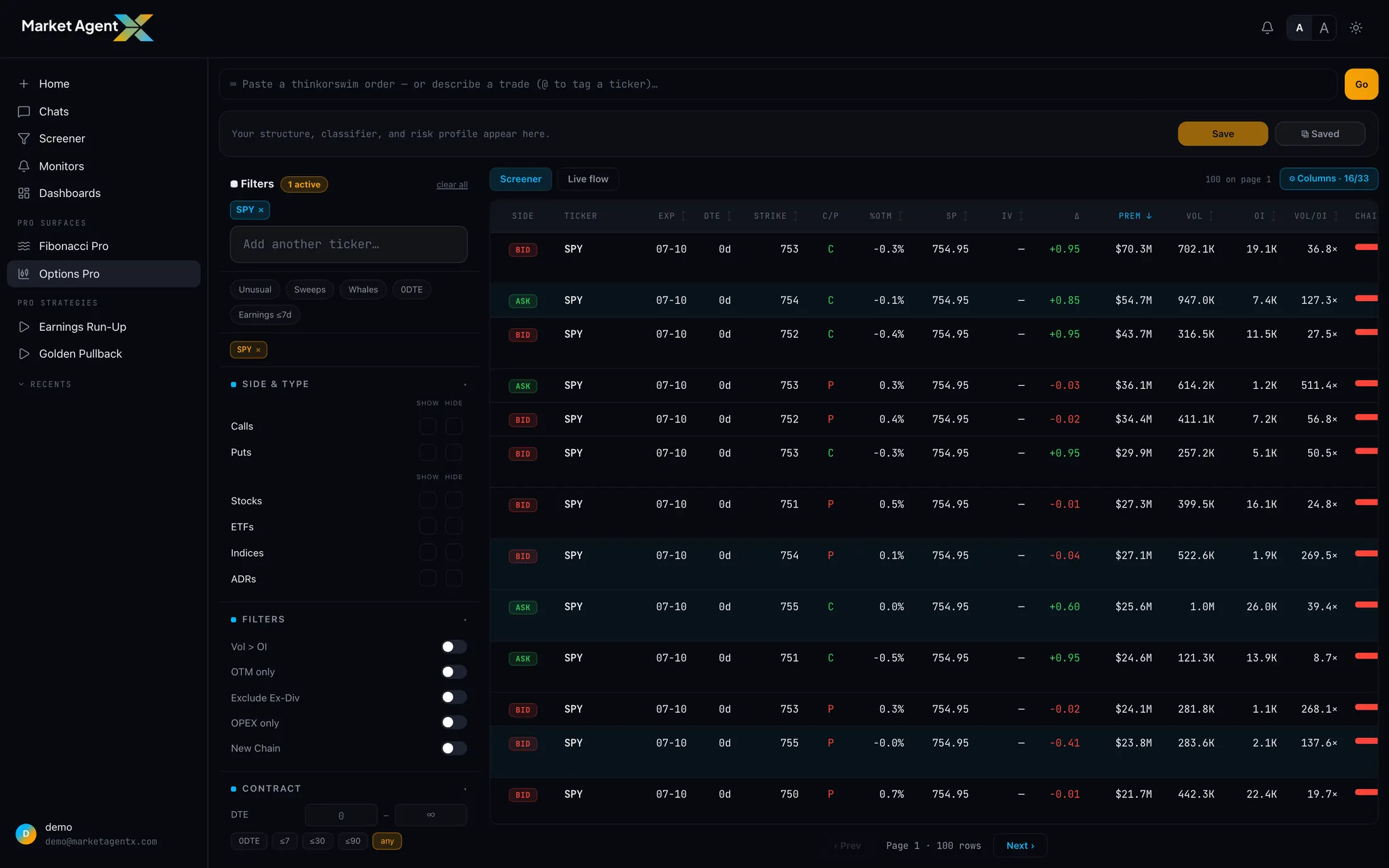
Alongside the quotes sits the flow — what's actually trading in these contracts. Volume, open interest, and notable activity give the chain a third dimension: not just what's quoted, but where the market's attention is. A strike with heavy, persistent activity is telling you something about where other participants see the battleground, and it's useful context to have on the same screen where you're choosing your own strikes.
The visual builder
Building a position in Options Pro is direct manipulation, not form-filling. Tap a strike to add a leg. Drag a leg's grip along the strike rail to move it and watch every number reprice as it slides. Flip a leg between call and put, buy and sell; adjust quantity; change expiry. The position is a picture you shape, and the surface keeps the picture and the math in lockstep.
That immediacy changes how you explore. "What if the short strike were five dollars wider?" stops being a re-entry exercise and becomes a one-second drag — so you actually try it, and the three variations after it. The builder makes iteration cheap, and cheap iteration is how you find the structure that genuinely fits your view instead of settling for the first one that works.
Payoff modeling: see the position's shape
Every structure renders as a payoff curve as you build: profit and loss across the price axis, maximum gain, maximum loss, and breakevens, all recomputed live as legs move. The questions that matter about any options position are visual questions —
- Where does this make and lose money at expiry?
- Where exactly are the breakevens, and how far are they from the current price?
- What's the worst case, and is it capped or open-ended?
- How does the shape change if I widen the wings or roll the whole structure up a strike?
— and the payoff view answers them at a glance, priced from the live chain rather than idealized mid-market assumptions. Risk you can see is risk you can reason about.
The structure library: 35+ named patterns
Options trading has a rich shared vocabulary — verticals, iron condors, butterflies, calendars, diagonals, jade lizards, and a few dozen more. Options Pro carries a library of 35+ named structures, each one encoded as a real pattern: which legs, what relationships between strikes and expiries, what the shape is for and what market conditions it expresses.
The library cuts both ways:
For newer options traders the library doubles as a working education: every named structure is a live, inspectable example on real quotes, not a diagram in a glossary. For experienced traders it's speed — the structure you already know you want, assembled in one action instead of eight.
From idea to structure: the workflow
Arrive with a view
Ideas come from anywhere in the workspace — a Full Analysis, a screener result, a Pro Strategy run, or a conversation with MAX. You can also describe the idea in chat and carry the suggested structure straight into the builder.
Read the chain
Open the symbol in Options Pro. Check the expiries in play, where the flow is concentrated, and what the quotes and Greeks look like at the strikes you care about.
Build and iterate
Start from a library structure or from bare legs. Drag strikes, flip sides, widen and narrow — watching the payoff curve and the net debit or credit respond in real time.
Stress the shape
Before you're done, interrogate the payoff: where are the breakevens relative to the levels that matter on the chart? Is the maximum loss a number you accept? Does the structure still express the original view, or did iteration drift it?
Take it with you
Options Pro is a research surface, not a brokerage — execution happens wherever you trade. When a structure is ready, export it in thinkorswim (TOS) format and carry the exact legs to your broker.
Every pane in Options Pro reads the same live data at the same moment. The payoff curve prices from the same quotes the chain displays; the flow context sits beside the strikes it describes. Options analysis assembled across disconnected tools accumulates small inconsistencies — a quote refreshed here but not there — and multi-leg structures are exactly where small inconsistencies compound. One surface, one clock, one truth.
A payoff diagram shows expiry outcomes and modeled paths — it can't promise fills at displayed quotes, and it doesn't make a structure a good idea. Options Pro makes the construction and the risk picture rigorous; whether the underlying view is right remains, as always, the research question.
Build on the live chain
Real quotes, a visual builder, payoff modeling, and 35+ structures — one surface from idea to export. Start your 7-day trial and open Options Pro.
Start 7-Day Trial →